The Hosting Placebo: Why "Cheap" Hosting is Expensive
1. Executive Summary
There is a dangerous placebo effect in the web hosting industry.
Business owners believe that because their website is "online," it is functional.
This is false.
If you are paying $2.99/month for shared hosting, you are not renting a server. You are renting a slum apartment with 500 noisy neighbors.
The "Hosting Placebo" convinces you that you are saving money.
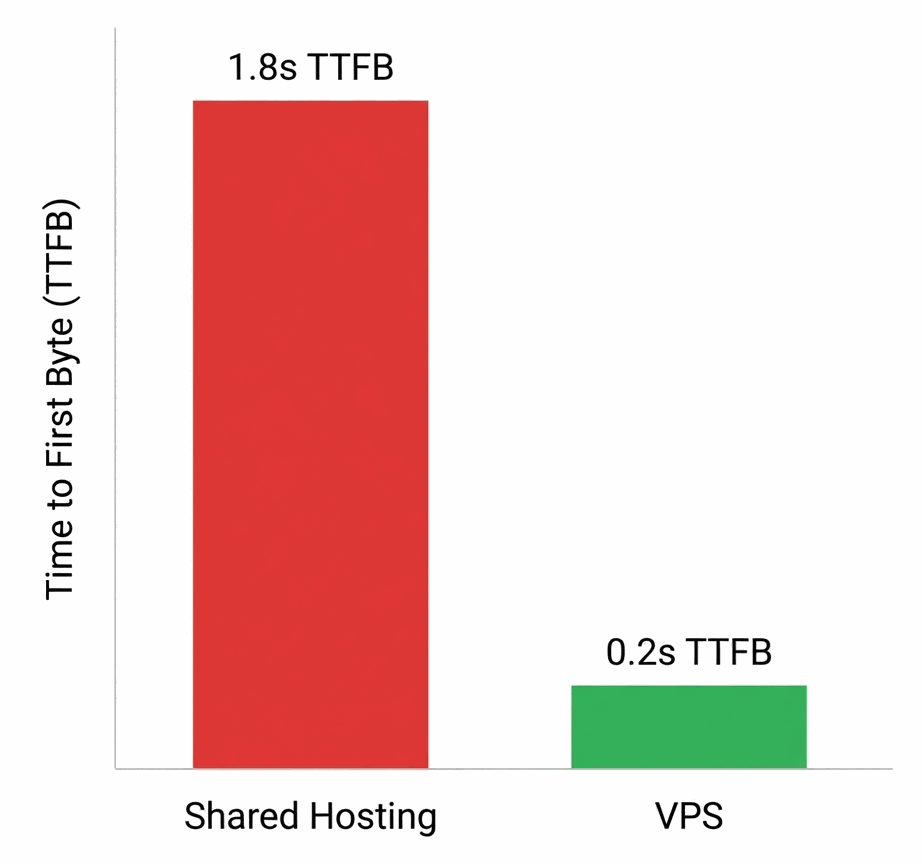
In reality, the latency introduced by overcrowded servers is costing you significantly more in lost conversions than the $20/month you are saving on the invoice.
2. The Diagnosis
To understand why cheap hosting kills revenue, we must look at the server architecture.
On a "Shared" plan (Bluehost, GoDaddy Basic, HostGator), your website lives in a single folder on a massive server.
That server also houses 3,000 other websites.
The Hidden Throttling
Host providers sell "Unlimited Bandwidth."
This is a marketing lie.
Whatever is "Unlimited" in data transfer is strictly capped in CPU Cycles.
If your WordPress plugin runs a complex query, the host's automated script will kill your process to protect the other 2,999 neighbors.
Your user sees a "500 Internal Server Error."
You lose the sale.
3. The Symptoms
Is your hosting the bottleneck? Look for these clinical signs:
- Slow Admin Panel: If your WordPress Dashboard takes 3+ seconds to load a page, your server's PHP processing power is maxed out.
- Intermittent Downtime: Your uptime monitor shows brief 1-minute outages throughout the day (micro-throttling).
- High TTFB: Go to PageSpeed Insights. If "Reduce Server Response Time" is a red flag, your hosting is the culprit.
4. The Treatment Plan
The cure for the Hosting Placebo is Resource Isolation.
You need a slice of a server that is yours and yours alone.
💊 Step 1: Managed Cloud (The Gold Standard)
Move to a Managed Cloud provider like Cloudways, Kinsta, or WPEngine.
These services use Google Cloud or AWS infrastructure but manage the technical side for you. You get clinical-grade speed without needing a PhD in Linux.
💊 Step 2: The Static Edge (For Non-WordPress)
If you don't use a CMS, move to the Edge.
Rx: Host on Vercel, Netlify, or Cloudflare Pages. These platforms serve your HTML directly from a CDN node close to the user. TTFB drops to near zero.
💊 Step 3: Database Optimization
Even good hosting chokes on a bad database.
Rx: Use a plugin like WP-Optimize to clean your database tables. Delete post revisions and spam comments. A lighter database queries faster.
5. Clinical FAQs
Is "Unlimited Bandwidth" real?
No. It is a marketing term. You will always hit a CPU or RAM limit (inodes) long before you hit a bandwidth limit. Read the fine print of your "Terms of Service" regarding "Fair Use."
Do I need a Dedicated Server?
Rarely. Unless you have 100,000+ visitors a month, a Dedicated Server is overkill. A robust VPS (Virtual Private Server) starting at $10-20/mo is sufficient for 99% of small businesses.
Does hosting affect SEO?
Directly. Google measures TTFB. If your server takes 2 seconds to respond, you are penalized before your content even loads. Uptime is also a factor; frequent downtime de-indexes your pages.
What about "Cloud" hosting from cheap providers?
Be careful. Many budget hosts rebrand their shared hosting as "Cloud" without changing the infrastructure. True Cloud hosting (like AWS, DigitalOcean, Google Cloud) creates isolated containers for your data.
Is SSD storage important?
Critical. Never use a host that uses spinning HDD (Hard Disk Drives). NVMe SSDs are the current standard and are 10-20x faster than traditional SSDs. Accept nothing less.